
QR Otter logoQR Otter
Solutions

Solution pages

Payment QR code

Use a Payment QR code to move users from physical touchpoints straight to checkout, subscription, or donation flow.

LinkedIn QR code

Use a LinkedIn QR code to drive profile, company page, and hiring traffic from events, business cards, and sales collateral.

Instagram QR code

Use an Instagram QR code to convert print engagement into profile visits, campaign clicks, and social interactions.

MobilePay QR code

Use a MobilePay QR code for faster payment journeys from posters, counters, flyers, and event materials.

Dynamic QR code

Update destinations and measure scans without reprinting the visual QR asset.

Create your own QR code with images

Build branded QR designs with image-backed visuals while keeping scan reliability balanced.

QR code with logo

Improve brand trust with a logo-enabled QR setup and scan-safe defaults.

QR code PNG

Export high-quality PNG files for websites, social media, and campaign assets.

QR code for website

Drive direct traffic from print and signage to your key landing pages.

Static QR code

Use static QR codes for fixed destinations where simple deployment is the priority.

Pick the exact QR use case your audience is searching for.

See all solutions
Industries

Industry pages

Restaurants and menus

Best for cafes, restaurants, and takeaway brands.

Events and tickets

Best for conferences, expos, and ticketed event teams.

Retail and campaigns

Best for multi-store operations and campaign teams.

Manufacturing and logistics

Best for SOP-heavy operations and compliance workflows.

Real estate and signage

Best for agencies and property teams with frequent updates.

Start with the most relevant playbook for your team.

See all industries
PricingAI QRContact
Choose language
DAEN
Log InStart for Free
QR Otter logoQR Otter
Choose language
DAEN
Open menu
Solutions
Payment QR codeLinkedIn QR codeInstagram QR codeMobilePay QR codeDynamic QR codeCreate your own QR code with imagesQR code with logoQR code PNGQR code for websiteStatic QR codeSee all solutions
Industries
Restaurants and menusEvents and ticketsRetail and campaignsManufacturing and logisticsReal estate and signageSee all industries
PricingAI QRContactLog InStart for Free

QR Otter

Platform for dynamic QR codes, tracking, and team collaboration.

Sales and support: hello@qrotter.com

Follow us: Facebook

Product

  • Pricing
  • Solutions
  • Industries
  • AI QR
  • What is a QR code?
  • Contact

Account

  • Log in
  • Create account
  • Forgot password

Legal

  • Privacy policy
  • Terms

© 2026 QR Otter. All rights reserved.

QR Code is a registered trademark of DENSO WAVE INCORPORATED.

Industries

QR for events and tickets

Manage ticketing, agenda links, and sponsor destinations with updateable URLs before, during, and after events.
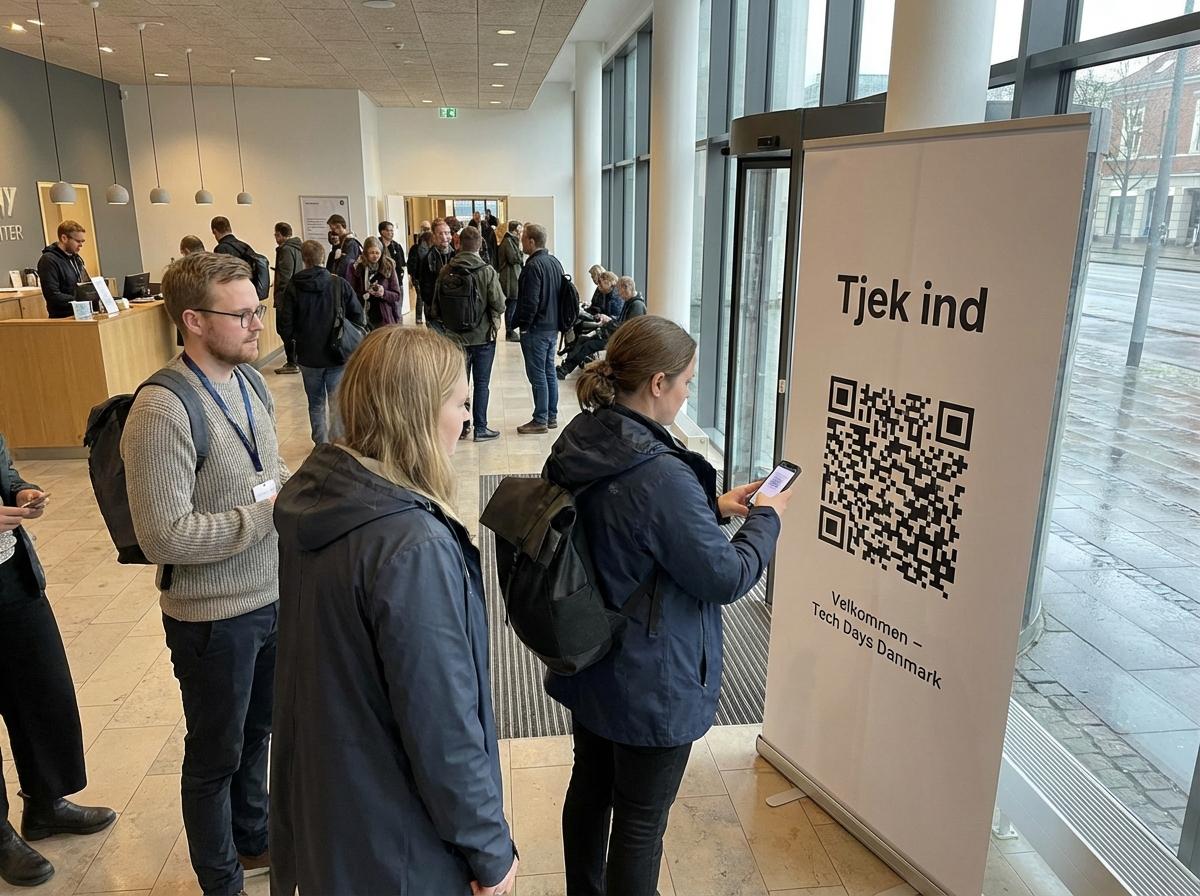
Photo from a tech conference using QR for event check-in

Common challenges

  • - Agenda changes after assets are distributed
  • - Many channels with separate QR variants
  • - No unified scan view across event assets

Recommended setup

  • - Split links for tickets, venue info, and agenda
  • - Track by campaign and channel
  • - Switch destinations during live events without reprinting

Expected outcomes

  • - Fewer support requests
  • - More resilient event operations
  • - Clear performance data

Practical use case

Example: conference with multi-channel promotion

An event team uses QR across email, social, and on-site materials for tickets, agenda, and sponsor activations.

  • - Ticket QR points to registration pre-event.
  • - On-site QR points to the live agenda during event.
  • - After event, the same QR points to a feedback form.

One printed asset can serve pre-, live-, and post-event needs with unified tracking.

Rollout plan

From pilot to stable operations

  1. Phase 1: Structure

    • - Define QR structure by channel and objective.
    • - Use clear naming for quick live reporting.
    • - Assign who can update destinations during event hours.
  2. Phase 2: Live operations

    • - Prepare fallback destination pages for agenda changes.
    • - Plan update windows for live switches.
    • - Monitor scan spikes in short intervals.
  3. Phase 3: Post-event

    • - Switch selected links to feedback or replay pages.
    • - Review channel-level performance and conversion patterns.
    • - Document improvements for the next event cycle.

KPI framework

Measure results with concrete KPIs

Ticket support requests

-20%

Signals smoother attendee flow.

Agenda-link scan share

Increasing during event

Shows attendees can find updated info quickly.

Post-event feedback rate

10-20% of attendees

Measures quality of post-event journey.

FAQ

Can one QR code be used before and during the event?

Yes, destination can switch from registration to live agenda without reprint.

How do we avoid confusion with many QR variants?

Use fixed naming by channel and keep a simple governance model.

Can we compare channel performance separately?

Yes, create distinct QR assets per channel.

Related pages

See plans and limitsBook rollout supportSee retail use case

Next step

We can support planning, governance, and rollout so your team gets value quickly.

Contact usBack to industries